
How To Login and Register for the 666PK Game App in Pakistan
The 666PK Game Login and Register page explains how new users can create an account and how existing users can access their accounts. A clear registration and login process helps users understand the basic account features, manage their information, and navigate the platform more confidently.

Name
666PK
Size
7 MB
Price
Free
666PK Game is presented as a mobile gaming platform with account access and different gaming options, depending on the current version. Before registering, users should review the platform’s available features, terms and conditions, privacy information, and applicable age requirements.
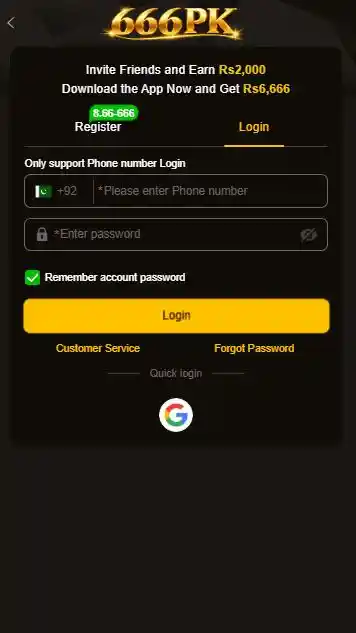
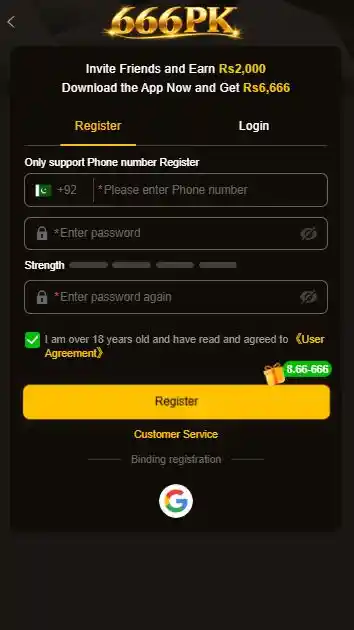
How to Login and Register on 666PK Game
Registration is the first step for users who want to create a new account. The information requested can vary depending on the current platform version, so follow the instructions displayed on the legitimate registration page.
Step-by-Step Registration Process
Step 1: Open the Registration Page
Visit the verified 666PK Game website or open the application from a trusted source. Locate the Register or Sign Up option.
Step 2: Enter Your Information
Provide the requested details, such as a mobile number or other supported account information. Make sure the information is accurate.
Step 3: Create a Password
Choose a strong password that is difficult to guess. Avoid using simple number combinations, your name, or passwords already used on other websites.
Step 4: Complete Verification
If the platform requests an OTP or another verification method, follow the instructions shown on the legitimate registration page. Never share your verification code with another person.
Step 5: Review the Information
Check your information carefully before submitting the registration form. Correct any mistakes before continuing.
Step 6: Complete Registration
Submit the form and wait for confirmation. If registration is successful, follow the displayed instructions to access your account.
Requirements for 666PK Game Registration
Before creating an account, make sure you have access to the information required by the registration form.
Common requirements may include:
- A compatible smartphone or web browser
- A stable internet connection
- A valid mobile number or supported login identifier
- A secure password
- Access to the requested verification method
- Agreement with the applicable platform terms
Registration requirements may change. Use accurate information and follow the instructions displayed in the current version.
How to Login and Register to 666PK Game
Once your account has been created, you can use the login page to access the platform.
Step-by-Step Login Instructions
Step 1: Open the 666PK Game application or verified website.
Step 2: Select the Login button.
Step 3: Enter your registered mobile number, username, or other supported login identifier.
Step 4: Type your password carefully.
Step 5: Complete any verification step requested by the platform.
Step 6: Select Login and wait for your account dashboard to load.
If the information is correct and the service is available, you should be able to access your account.
Forgot Your 666PK Password?
Forgetting a password can happen, particularly when an account has not been used for some time. If you cannot remember your login password, look for the Forgot Password option on the legitimate login page.
Follow the recovery instructions provided by the platform. You may be asked to verify your identity through a supported method before creating a replacement password.
Choose a new password that you have not used elsewhere. Avoid sharing your login information with anyone who claims they can recover your account through an unofficial service.
How to Fix 666PK Login and Register Problems
Sometimes users experience problems when trying to sign in. These issues may be related to incorrect credentials, internet connectivity, outdated applications, or verification delays.
Try the following troubleshooting steps:
- Check that your registered details are correct.
- Make sure the password has been entered accurately.
- Confirm that your internet connection is working.
- Close and reopen the application.
- Check whether a legitimate application update is available.
- Use the official password recovery process if necessary.
- Contact verified support if the issue continues.
Avoid repeatedly entering incorrect passwords, as this may trigger temporary account restrictions on some platforms.
666PK OTP Verification Problems
An OTP is a temporary verification code used to confirm access to an account or complete a security step. If you do not receive a code, check your mobile signal and confirm that the registered number is correct.
Wait briefly before requesting another code. If multiple codes arrive, use the most recent valid code according to the instructions displayed on the screen.
Never share an OTP with another person, even if they claim to be a platform employee or support representative.
Benefits of Creating an Account
A registered account may allow users to access features that are unavailable to visitors who have not signed in. Depending on the current version, these features may include:
Account Access
Users can sign in to their account and access the available platform sections.
Personal Settings
An account may provide settings for managing personal information, security preferences, and other account details.
Game Access
Registered users may be able to browse the games available through the platform.
Transaction History
If wallet features are available, the account may display transaction records and related information.
Support Assistance
Account details can help verified support staff identify an account when assistance is required. Never provide your password or OTP during a support request.
How to Keep Your 666PK Account Secure
Account security is important whenever personal information or financial features are involved.
Use a unique password and avoid saving login credentials on shared devices. Keep your phone protected with a PIN, password, or biometric lock.
Do not open suspicious links sent through messages or social media. Always confirm that you are using the correct website or application before entering account details.
If you suspect that another person has accessed your account, change your password through the legitimate account settings or recovery process as soon as possible.
Common Registration Errors
New users may encounter registration errors when information is incomplete or a verification step has not been completed.
If the registration form does not submit, check the required fields and correct any mistakes. Make sure your internet connection is stable and follow the instructions displayed by the platform.
If a message indicates that an account already exists, use the login or account recovery process rather than repeatedly creating new accounts.
If the problem continues, seek assistance through a verified support channel.
Important Information Before Logging In
Always use a trusted source to access the 666PK Game login page. Avoid entering personal information on unfamiliar websites that copy the name or appearance of another platform.
If you use an Android APK, verify its source before installation and review the permissions it requests.
Also, read the platform’s terms and privacy information before creating an account. If the service offers real-money gaming, check applicable laws and age requirements. Financial losses are possible, and gaming should never be treated as guaranteed income.
Frequently Asked Questions
How do I register on 666PK Game?
Open the legitimate registration page, provide the requested information, create a secure password, complete any required verification, and submit the form.
How do I log in to my 666PK account?
Select Login, enter your registered credentials, complete any required verification, and follow the instructions displayed on the screen.
What should I do if I forget my password?
Use the Forgot Password option on the legitimate login page and follow the account recovery instructions.
Why am I not receiving an OTP?
Check your mobile signal and registered number, wait briefly, and follow the instructions for requesting another code.
Can I change my password?
If password management is available, use the account settings or password recovery feature to create a new secure password.
Is registration free?
Check the current registration page and terms for any applicable requirements. Do not make an unexpected payment simply to create an account.
How can I protect my account?
Use a unique password, keep verification codes private, avoid suspicious links, and access the platform only through a source you trust.
Final Words
The 666PK Game Login and Register Guide 2026 explains the general process of creating an account, signing in, recovering a forgotten password, and resolving common verification problems.
Before registering, check the current platform requirements and review the applicable terms. After creating an account, keep your login credentials secure and use verified support channels if you experience difficulties.
Following these basic steps can help beginners understand account access more clearly while protecting their personal information and making informed decisions about the platform’s available features.